
What's New
 Highlights
 Available to all clients
Available upon request
Available to all clients
Release Notes
Available to all clients
Available to all clients
Available upon request
Available to all clients
Release Notes
LOYALTY RELEASE 26.10.0
Admin and Program: Accessibility Improvements Across the Loyalty Console
Available to all CLIENTS
Background
Accessible administration experiences help teams navigate, understand, and interact with the tools they use to manage loyalty programs.
This release expands accessibility improvements across a broad range of Loyalty Console experiences and shared interface components, creating a clearer and more consistent experience across everyday Loyalty administration workflows.
Solution
Accessibility improvements now extend across Offers, Members and CSR, Referrals, Segments, Punch Cards, Challenges, Rewards, Orders, Order Rules, Earn Rules, Triggered Actions, Programs, Analytics, and administrative experiences including Users, Apps, Roles, Places, Content, and Import/Export Jobs.
Enhancements across these experiences include:
-
Clearer labels and controls - Makes applicable forms, search and filter controls, links, and actions easier to identify.
-
Improved page structure and organization - Provides clearer structure and relationships across applicable headings, tables, tabs, and other interface elements.
-
Better handling of images and visual content - Improves the accessibility of applicable images and other non-text content.
-
Improved color and contrast - Makes applicable content and interface elements easier to distinguish and reduces reliance on color alone.
-
Improved focus behavior - Provides more visible focus treatment and improves focus order across applicable experiences.
The release also improves shared Console components, including navigation controls, search and filter controls, interface widgets, image handling, focus treatment, and theme colors. Because these components are used throughout Loyalty, improvements at the shared level extend across multiple Console experiences.
Key Benefits:
-
A more accessible administration experience: Strengthens accessibility across a broad range of Loyalty configuration, member-management, and operational workflows.
-
Clearer, easier-to-understand experiences: Improves labels, structure, contrast, and visual presentation across key areas of the Console.
-
More visible and predictable focus: Improves focus visibility and focus order across applicable experiences.
-
Greater consistency across Loyalty: Extends accessibility improvements through shared Console components used across multiple experiences.
Earn Rules: Clearer Earn Rule Summaries
Available to all CLIENTS
Background
Earn Rules need to be easy to understand for marketers and program managers who are managing loyalty strategy, not reading script logic. When conditions and calculations are shown as technical expressions, it can be difficult to tell what a rule will actually do during setup or review. A clearer summary helps teams validate and manage rule behavior faster and with more confidence.
Solution
Loyalty now supports concise, human-readable summaries for Earn Rule conditions and calculations in the listing view. Marketers can quickly scan what each rule is doing without opening the full edit flow and reading through scripting logic, while the underlying Groovy or script logic remains available when deeper review is needed. If the system cannot generate a safe summary, Loyalty shows a clear fallback message instead of exposing raw technical output.
Key Benefits:
-
Faster rule review: marketers and program managers can understand rule intent at a glance.
-
Better setup confidence: business-friendly summaries make it easier to confirm the rule matches the intended earn behavior before launch.
-
Less technical friction: the list view replaces script-heavy expressions with readable language.
-
Safer fallback behavior: when a summary cannot be generated, the UI shows a clear message instead of technical output.
For more information, see Getting Started with Earn Rules.
Triggered Actions and Activity Processing: Trigger Execution Statistics and Failure Alerts
Available to all CLIENTS
Background
Triggered Actions can play an important role in orchestrating Member engagement and connecting Loyalty with external systems. As these workflows become more sophisticated, program administrators and marketers need better visibility into how their Triggers are performing so they can understand activity, identify opportunities for optimization, and quickly investigate unsuccessful executions.
Solution
Loyalty now provides Triggered Action execution statistics, giving marketers visibility into total executions, successful executions, and failures across the past day, past week, and past month.
When failures occur, marketers can access detailed information about those executions, including the execution date and time, relevant payload information, and error messages. Failure details are retained for 60 days to support investigation and troubleshooting.
Marketers can also configure daily failure alerts that summarize Triggered Action activity and provide a direct link to the associated failure details. Rather than generating an email for every individual failure, Loyalty provides a consolidated daily summary when failures occur.
Key Benefits:
-
Understand Triggered Action performance with execution, success, and failure metrics.
-
Investigate failures faster using execution details and error information.
-
Stay informed automatically with daily failure summaries.
-
Monitor operational health without relying on manual log analysis.
For more information, see View Triggered Action Statistics.
Triggered Actions and Activity Processing: Clearer Triggered Action Summaries
Available to all CLIENTS
Background
As Triggered Action rules become more complex, program teams need a faster way to understand what a rule is doing without opening the full editor every time and reading through Groovy heavy scripting. That becomes especially valuable when teams are reviewing larger automation sets and need to scan behavior quickly.
Solution
Loyalty now shows readable summaries of trigger conditions and actions directly in the listing view, making the list view easier to scan while keeping the full rule logic available in Edit. Summaries are regenerated when a rule is saved, so the listing stays current as teams update rules. If summary generation fails, the experience supports retrying the summary and falls back to a clear message that directs users back to Edit for complete logic. This gives teams a faster overview without losing access to the original rule structure.
Key Benefits:
-
Scan rules faster: Readable summaries make it easier for teams to understand Triggered Actions at a glance.
-
Review automation with less friction: Listing-level summaries help administrators assess behavior without opening every rule.
-
Keep the full logic available: The Edit experience still preserves the underlying rule details when deeper changes are needed.
-
Reduce review overhead: Faster rule comprehension helps teams manage larger automation sets more efficiently.
For more information, see the Getting Started with Triggered Actions.
Rewards: Program-Level Redemption Limits
Available to all CLIENTS
Background
Loyalty programs often need to balance Member access to Rewards with program economics and Reward availability. A configurable redemption limit gives marketers another way to manage Reward spend while tailoring controls to the needs of their loyalty strategy.
Solution
Loyalty now allows administrators to configure a program-level redemption limit based on a defined Metric, interval, and time zone. Limits can be configured on an hourly, daily, monthly, or yearly basis. Individual Rewards can then be configured to participate in the program-level limit.
For example, a program could configure a daily redemption limit and apply it only to selected high-value Rewards. When a Member attempts an applicable redemption, Loyalty evaluates the Member's current redeemed amount and determines whether the new redemption would exceed the configured limit. The limit is based on the Member Metrics actually being spent, so the same business rule can apply regardless of whether the eligible redemption is initiated through standard Member redemption, a Triggered Action, CSR redemption, or an applicable import flow.
Key Benefits:
-
Manage reward economics with a configurable program-level redemption cap.
-
Choose the right control period with hourly, daily, monthly, or yearly limits.
-
Apply limits selectively to the Rewards that need additional control.
-
Enforce limits in real time before an applicable redemption is completed.
-
Apply a consistent business rule across supported redemption mechanisms.
For more information, see the Program Setting Category - Redemption Controls.
Wallet Pass: Personalized Wallet Pass Designs
Available UPON REQUEST
Background
Wallet Passes can be more than a convenient way to store a loyalty card; they can also reinforce a Member's progress, recognition, and relationship with a brand. Many loyalty programs have meaningful Member Attributes such as tier, visit count, points to next reward, or region, and marketers can use those Attributes to create more personalized Member experiences. Personalized Wallet Pass Designs make it possible to reflect those values directly in the visual design of the Member's Pass.
Solution
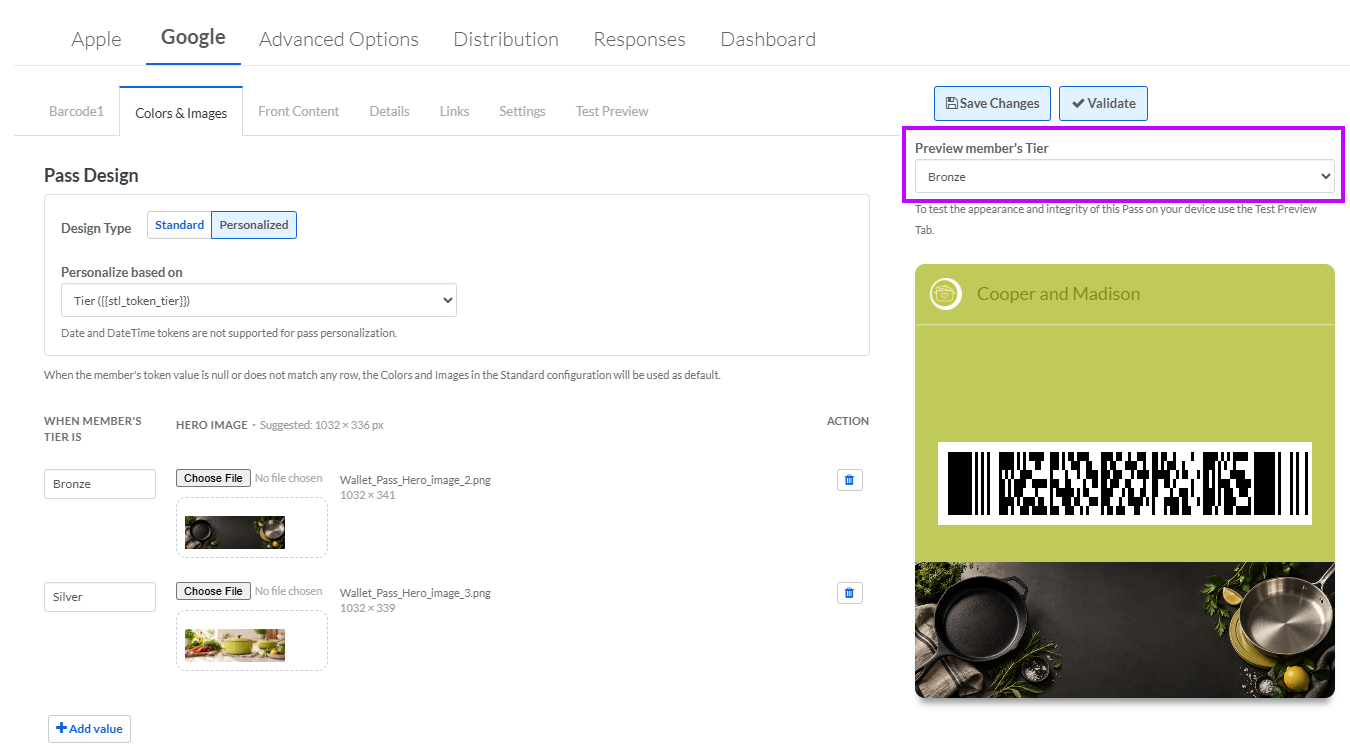
Loyalty now allows marketers to create Personalized Wallet Pass Designs by mapping a Content Token to different visual designs.
For example, a loyalty program could use a Member's loyalty tier to create a more engaging Wallet Pass experience:
-
Bronze Members see a Bronze-themed design.
-
Silver Members see a Silver-themed design.
-
Gold Members see a Gold-themed design.
-
Members whose value does not match a configured mapping use the standard design.
The same approach can be used for other Member Attributes. A brand could, for example, use visit count to change the pass imagery as Members progress through a visit-based loyalty journey.
Marketers configure the mappings directly in the Pass Editor. Apple Wallet supports configurable background, label and value colors and strip imagery, while Google Wallet supports configurable hero imagery.
A new simulator allows marketers to select a configured value and preview the corresponding Pass design before publishing. This simulator is intended to make it easier to validate the experience without requiring real Member data. The existing Test Pass on Device capability remains available when a live Test Member record and physical-device validation are required.
Key Benefits:
-
Make Wallet Passes more personalized by reflecting meaningful Member Attributes.
-
Recognize Member progression with designs that can change by loyalty tier or other values.
-
Create more engaging experiences around milestones such as visits or loyalty progression.
-
Configure everything in the Pass Editor without custom development.
-
Preview designs before publishing to improve confidence in the final Member experience.
Availability
Personalized Wallet Pass Designs is controlled by a feature flag and can be enabled in non-Production or Production environments. Clients may enable the feature in a non-Production environment first to test and validate their Wallet Pass configuration before enabling it in Production. To request enablement, contact your Customer Success Manager or Zeta Support.
For more information, see Getting Started with Mobile Wallet Pass.
API Connectors and Integrations: Reward Categories in the Rewards API
Available TO ALL CLIENTS
Background
Brands increasingly deliver loyalty Rewards through multiple channels and digital experiences. Giving those experiences richer Reward metadata makes it easier to organize, filter, and present Rewards in ways that are relevant to Members.
Solution
The List All Rewards Program API now returns Reward Category information, giving downstream applications access to the Categories associated with each Reward. This can be used to support experiences such as organizing Rewards by channel or business use case, for example, or by separating Rewards intended for a kiosk, mobile app, or other customer experience. The underlying requirement was driven by the need to use Reward Categories when consuming the Rewards API.
Key Benefits:
-
Organize Rewards more effectively using Reward Category information.
-
Support richer digital experiences with additional Reward metadata.
-
Improve downstream filtering for connected applications.
For more information, see Program API.
API Connectors and Integrations: Consistent Stellar POS Transaction Metric Responses
Available UPON REQUEST
Background
Consistent API responses make integrations easier to build, maintain, and troubleshoot. For loyalty programs using the Stellar POS API, having predictable Metric values across different transaction scenarios helps connected applications process responses reliably without needing to account for differences in how transactions are evaluated.
Some business units may use Order Rules to calculate transactional earnings, while others may not use Order Rules at all. Providing greater consistency across these scenarios gives brands more control over how POS transaction results are represented and how base earning behavior is handled.
Solution
Loyalty now provides more consistent POS API Metric responses across transactions processed with and without Order Rules. When configured, the details.metrics.point value is returned consistently as a numeric value rather than changing between a number and a string depending on the processing path.
The enhancement also provides configuration control over the default earning behavior for transactions where no Order Rule is applied. When configured, those transactions can return a 0-point earn instead of automatically awarding points based on the transaction subtotal, while transactions that match an Order Rule continue to earn according to the configured rule.
Key Benefits:
-
Simplify POS integrations with more consistent Metric response types across transaction scenarios.
-
Reduce downstream processing logic by minimizing the need to handle different data types based on whether an Order Rule is applied.
-
Gain greater control over base earning behavior for business units that do not use Order Rules.
-
Support different earning strategies across business units while maintaining a more predictable POS integration experience.
Availability
This enhancement requires environment configuration and is not enabled by default for all environments. To request enablement, contact your Customer Success Manager or Zeta Support.
Note: Configuring transactions without Order Rules to earn 0 points changes actual earning behavior. Business units without Order Rules will stop awarding points, so the desired earning behavior should be confirmed before enabling this configuration in Production.
For more information, see the POS API Developer Guide.
API Connectors and Integrations: Consistent Points Rounding for Returns
Available to all CLIENTS
Background
Accurate and predictable Metric calculations help loyalty programs maintain Member trust, particularly when Members return individual items from a purchase. When a purchase contains multiple items, the Metrics associated with a return can vary depending on whether a Member returns one item, multiple items, or the remaining items in a later transaction. Providing more consistent return calculations helps ensure that Members receive the expected Metric adjustment while preserving the integrity of the original Metrics earned.
Solution
Loyalty now provides more consistent Metric calculations for returns processed through the Return API.
The Return API now calculates the Metric value associated with the specific items and quantities being returned, rather than determining the return solely from the difference between the original basket and the remaining basket. This allows the returned item to follow the same rounding approach used when its value is calculated for purchase accrual.
For example, if a member earns 125 Points on a two-item purchase and later returns an item worth $62.56, the Returns API now calculates the returned value as 63 Points, rather than 62.
The calculation also accounts for partial and sequential returns. When multiple returns are processed against the same original transaction, Loyalty caps the total Metric value returned at the amount originally earned. Any rounding residual can therefore be absorbed by a subsequent or final return, preventing the Member's account from being over-adjusted.
Key Benefits:
-
Provide more consistent Metric deductions for items returned through the Return API.
-
Align return calculations more closely with purchase rounding for individual returned items.
-
Improve predictability for partial returns when only some items from an order are returned.
-
Preserve Metrics accuracy across sequential returns by preventing the total clawback from exceeding the original Metrics earned.
-
Deliver a more consistent Member experience when Metrics are adjusted following returns.
For more information, see Return API.
Roles and Permissions: Granular Access to Member Metrics in Member CSR and Member Screens
Available to all CLIENTS
Background
Different teams need different levels of access to Member Metric information based on how they support and manage a loyalty program. A Customer Service Representative (CSR) may need to review a Member's balances while answering a service question, while other operational users may need more detailed access to Metric balances and activity within the Member Profile. Giving administrators more granular control over these experiences makes it possible to provide users with the Metric information they need while limiting access to broader Member administration capabilities.
Solution
Loyalty now provides more granular Role permissions for viewing Member Metric information across the CSR and Member Details experiences, allowing organizations to give users access to the Metric information they need without granting broader Members Admin permissions.
Administrators can independently configure:
-
Summary permission — Gives authorized users access to the Summary tab within Member CSR, where they can switch between available Member Metrics and view the corresponding balance and activity totals.
-
Metrics permission — Gives authorized users access to the Metrics tab within Members, where they can review Member Metric balances and associated Metric activity and switch between available Metrics.
For example, a CSR supporting a Member whose program tracks Points, Lifetime Points, and Visits can be given access to the Member CSR Summary tab and switch between those Metrics to answer Member questions, without also receiving broader administrative capabilities such as merging or deleting Members. This gives organizations greater flexibility to configure roles based on whether a user needs access to the CSR Summary experience, the more detailed Members Metrics experience, or both.
For more information, see Define Permissions for a Role.
Roles and Permissions: Granular Permissions for Metric Adjustments
Available to all CLIENTS
Background
Different teams and operational roles may have different responsibilities for managing Member Metric balances. While some users may need full authority to add and deduct Metrics, others may only need permission to perform a specific type of adjustment.
More granular permissions give organizations greater flexibility to align Member balance management with their operational processes and role-based access policies.
Solution
Loyalty now provides separate Add Metrics and Deduct Metrics permissions, allowing administrators to independently control the types of Metric adjustments each Role can perform.
Administrators can configure a Role to:
-
Add Metrics only — Allow users to increase a Member's Metric balance without permitting deductions.
-
Deduct Metrics only — Allow users to reduce a Member's Metric balance without permitting additions.
-
Add and Deduct Metrics — Allow users to perform both types of adjustments.
-
Neither — Prevent users from accessing the Adjust Metrics action.
For example, an organization could give an Admin role permission to both add and deduct Metrics while configuring a CSR role to deduct Metrics only.
The CSR experience automatically reflects the permissions assigned to the user's role. When a user has only one adjustment permission, the Adjust Metrics experience displays only the permitted Add or Deduct option. When a user has neither permission, the Adjust Metrics action is not available.
The permissions are also enforced when an adjustment is submitted, helping ensure users cannot perform an Add or Deduct action that is not authorized for their Role. Existing Roles using the previous Adjust Metrics permission remain supported with access to both Add and Deduct actions. When an administrator edits one of these roles, the new Add Metrics and Deduct Metrics permissions are reflected in the Role configuration and can be updated independently going forward.
Key Benefits:
-
Align Metric adjustment permissions with operational responsibilities by independently controlling Add and Deduct actions.
-
Apply more precise role-based access instead of granting both adjustment capabilities together.
-
Reduce unnecessary access by giving users only the Metric actions required for their Role.
-
Create a clearer CSR experience by showing adjustment options based on the user's assigned permissions.
-
Enforce permissions throughout the adjustment workflow so unauthorized Add or Deduct actions cannot be submitted.
-
Maintain existing role behavior with backward compatibility for the previous Adjust Metrics permission.
For more information, see Define Permissions for a Role.
Member Profiles and Data: Improved CSR Member Search
Available to all CLIENTS
Background
Customer service teams need to locate Members quickly using the information available to them. Supporting multiple common search methods makes it easier for CSRs to find the right Member and resolve questions efficiently.
Solution
Loyalty now provides improved Member search behavior when locating Members using first and last name, making name-based lookup more consistent with other supported search methods such as email.
Key Benefits:
-
Find Members more efficiently using familiar identity information.
-
Support faster CSR workflows with more reliable name-based searches.
-
Reduce the need to try multiple search methods.
For more information, see Search for a Member.
Platform Updates: Updated Phone Validation Support
Available to all CLIENTS
Background
Phone validation rules change over time, and brands need the platform to stay current so member contact data can be checked reliably across markets. When validation libraries lag behind, otherwise valid numbers can be rejected or handled inconsistently.
Solution
Loyalty updates its phone validation library to keep validation behavior current and more reliable across regions. That update helps maintain consistency when brands collect or validate Member phone numbers and reduces the chance of mismatches caused by outdated regional rules. The change supports more dependable member data validation without changing the overall experience for program teams.
Key Benefits:
-
Keep validation behavior current: Updated phone validation helps brands rely on more up-to-date rules.
-
Improve contact-data quality: More reliable validation supports cleaner Member sign-up flows and records across markets.
-
Reduce validation mismatches: Updated library behavior helps avoid issues caused by outdated rules.
-
Support global programs more consistently: Brands can validate Member phone numbers with greater confidence.
Resolved Issues
Bug Fixes
-
Resolved an issue where Triggered Actions could appear in reverse order in the Loyalty Console when using the new tabbed modal. The stored and runtime execution order was not reversed, but the console display order could be misleading.
-
Resolved an issue where the Retro Claim Wizard could not reliably identify the correct order when transaction IDs had been reused across multiple transactions. The search now uses the business date to distinguish otherwise identical transaction IDs and avoids selecting an arbitrary order when multiple matches remain ambiguous.
-
Resolved an issue where Scheduled Jobs could fail to retrieve Members returned by their configured Segment, even though the Segment itself returned eligible Members.
-
Resolved an issue where point expiration processing could skip eligible points even though an expiration job completed successfully.
-
Resolved an issue where an Import Definition could not be switched back to an SFTP connector after temporarily using a desktop file upload.
-
Resolved an issue where an Offer header could continue displaying an outdated Display Name instead of the configured Header value.
-
Resolved an issue where the extra_json[text] value supplied through the Respond to a Reward Member API was not being persisted to the resulting Reward activity.
-
Resolved an issue that could leave the calculation engine in a rebalance state and delay processing when Kafka connections became idle during a long-running calculation.
-
Resolved an issue where the Member Account Merge feature could become unavailable in the Loyalty Console after an upgrade.
-
Resolved an issue that prevented new Members using Google sign-in from completing account creation and authentication.
-
Resolved an issue where invalid Analytics query requests could generate a server error instead of being rejected as invalid input.
-
Resolved an issue where concurrent Reward Awards using certificate-backed Offers could fail because of lock contention during certificate allocation.
-
Resolved an issue where a Punch Card batch email job could fail when an associated Member record was no longer available.
-
Resolved an issue where POS return processing could fail when previously stored return quantities were represented as text values.
-
Resolved an issue where the Punch Card status API could fail when transaction punch data did not contain the expected Named Punch information.
-
Resolved an issue where Punch Cards could be issued to Members who were outside the configured inclusion Segment.
-
Resolved an issue that could prevent Members from continuing to redeem Rewards after earlier redemptions had not completed activity processing.
-
Resolved an issue where adding a Segment to an Advanced Campaign Audience could result in an error and prevent the audience configuration from loading correctly.
-
Resolved an issue where a single activity could fail to award multiple eligible named Punch Card punches.
-
Resolved an issue where Offers could be omitted from the Member Offer Response when a Campaign Audience used Simple mode.
-
Resolved an issue where account and device state could interfere with normal Member login and checkout activity after Member records were recreated.
-
Resolved an issue where data returned through Trino did not match expected Hive data during validation of the Trino-Hive conversion.
-
Resolved an issue where device registrations could become associated with multiple Members, which could result in push notifications being routed to an incorrect Member.
-
Resolved an issue where Daylight Saving Time offsets were not reflected correctly in time zone selections used when configuring Offers and Rewards.
-
Resolved an issue affecting historical Multi-Question Survey responses where survey question data was missing from responses created before the underlying issue was corrected.
-
Resolved an issue where selecting Show Expression while editing a Triggered Action or Earn Rule could briefly display the expression and then unexpectedly close the edit modal. Users can now review the expression without being exited from the configuration workflow.
Maintenance and Release Schedule
See Loyalty Upcoming Releases for the platform release schedule.
See System Maintenance for details on the next system maintenance window, per region.
Platform Status
The status page provides you with regular updates regarding the status of the Loyaltyplatform in the event of a major system incident in your region. In this article we’ll explain the information you will see and how to subscribe to the Loyalty notification system to receive regular updates on the platform status, which we highly recommend to all users.
See Platform Status for more details.
